

At Experion, we don’t just understand visitor management – we build it. From custom kiosk workflows to enterprise-grade integrations, our team has the hands-on expertise to turn your operational requirements into an effortless digital experience
Each day, thousands of visitors enter offices, buildings, and organizations, yet they are greeted only with a logbook to record their details.
In this digital age, this outdated process is a problem. It reveals a security gap, suggesting we are not as professional as we appear.
A modern visitor management system is the need of the hour to improve the overall visitor experience. Regardless of whether you have a single office or a multi-location enterprise, it replaces the paper trail with a digital experience. Gain full visibility into who’s in your building, when they arrive and leave, and the purpose of their visit.
This blog covers everything you need to know: what a visitor management system is, how it works, the features to look for, and how to choose the best visitor management system.
Key Takeaways
- A visitor management system automates the entire visitor lifecycle, starting from pre-registration to check-out.
- Modern systems offer cloud, web, on-premises, and mobile options that suit various organizational setups.
- Key features include, but are not limited to, contactless check-in, ID scanning, real-time host notifications, watchlist screening, and audit logs.
- Industry-specific solutions address the unique needs of offices, hospitals, enterprises, and building complexes.
- Compliance with GDPR, HIPAA, and other data compliance frameworks is built into most visitor management solutions.
- The future of visitor management revolves around AI screening, facial recognition, IoT integration, and predictive analytics.
What is a Visitor Management System?
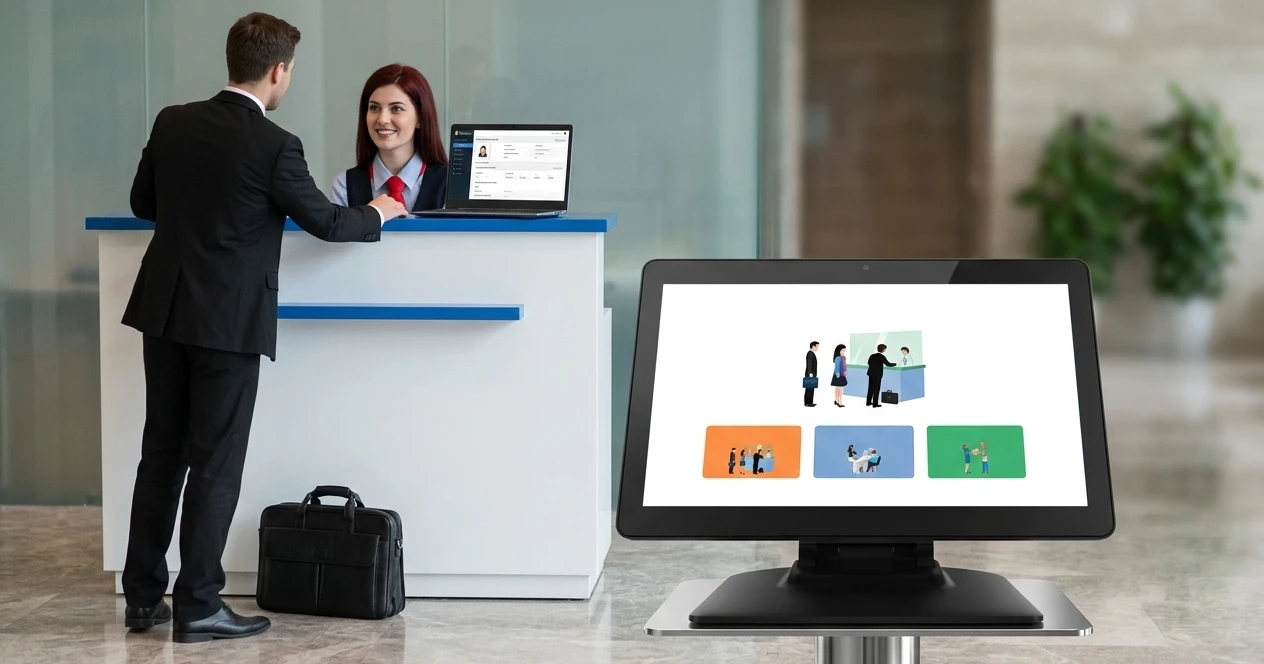
A visitor management system (VMS) is a digital platform that records the movement of visitors entering and exiting a facility or building. It replaces traditional paper sign-in sheets with automated data-driven workflows.
Think of it like an end-to-end system that covers every stage of a visitor’s journey into your enterprise. It can capture everything – From a visitor’s pre-arrival registration to storing their data post-visit.
A visitor management system can run as a cloud-based platform, a web portal, a mobile app, or an on-premise system. This depends on the deployment mode you choose.
At its core, it serves as a digital paper trail for who is on your premises at any given minute.
Why Organizations Need Visitor Management Today?
Organisations have changed drastically. Regulations on data and physical security have increased. Visitor contact information needs to be captured securely. Organisations also need to adhere to building occupancy limits.
Moreover, the post-COVID era means hybrid models, and the reception desks may be unstaffed for a few hours. All of these stringent rules signal the need for a proactive visitor management solution. One that screens visitors before they arrive, notifies hosts the moment a guest checks in, and maintains a tamper-proof audit trail for compliance.
Problems With Traditional Sign-In Methods
Traditional sign-in methods involve a visitor’s book, where visitors write their names and details. This poses a significant risk, as every new arrival could view the previous visitor’s details. In effect, it leads to a serious GDPR and HIPAA violation.
- Other drawbacks of the traditional method include:
- Visitor details can be easily modified
- Provides no real-time alerts
- No audit trail
- No integration with access control or HR systems.
- Absence of watchlist screening
Evolution From Logbooks to Automated Visitor Management System
The transition from logbooks to an automated visitor management system was gradual.
The first move was towards Digital sign-in tablets. This was followed by pre-registration via email invite, allowing visitors to complete details before their arrival. The latest evolution is an automated visitor management system. This system integrates with Active Directory, Access Control Systems, HR platforms, and CCTV infrastructure. Visitor Entry is thus an integrated workflow instead of a Standalone Reception Process.
Difference Between Visitor Management System and Visitor Tracking System
Both these terms sound familiar and are used interchangeably. On the contrary, each refers to distinct capabilities.
A visitor management system handles the full range of administrative and security functions, including pre-registration, check-in, badge printing, host notification, and check-out. A visitor tracking system or visitor tracking app focuses on monitoring visitors’ locations within the organization in real time. They would often be using RFID badges or QR codes.
In practice, the best visitor management system software comprises visitor tracking capabilities as a core module. This gives security teams a live dashboard of everyone on the premises and alerts them if a visitor enters a restricted area or stays beyond their assigned time window.
How a Visitor Management Software Works?
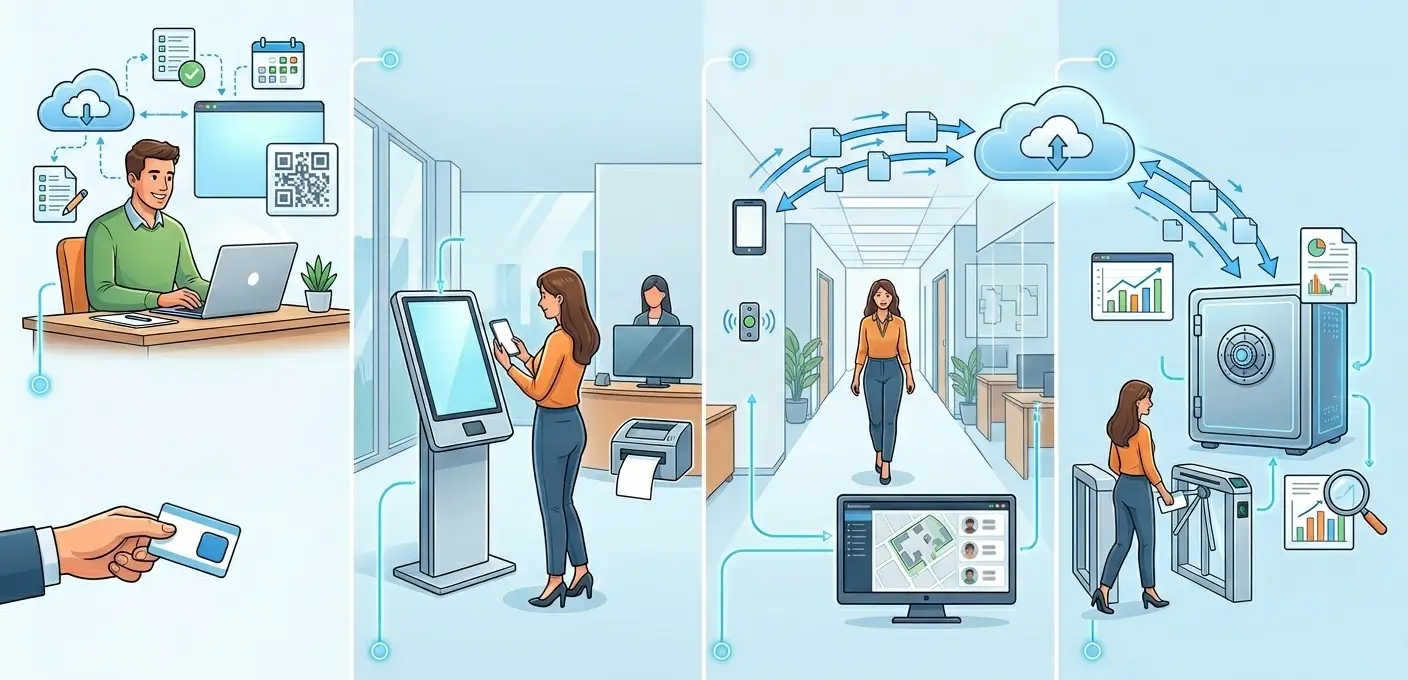
Core Components of Visitor Management Software
Breaking down the visitor management software development into its core components:
- A digital front-end (kiosk, tablet, or web portal) for visitor self-service
- A back-end database for storing visitor records
- An integration layer that connects with access control, HR, and communication systems
- Reporting and analytics engine for visitor insight.
Step-by-Step Visitor Check-In Process
The check-in process begins with a pre-registration invite sent by the host. The visitor then receives a QR code or PIN by email. On arrival, they scan their code at the self-service kiosk, upload or scan their ID, review and sign any required NDAs or safety documents.
They then receive a printed or digital badge- a temporary identification pass after checking in. The host receives notifications via SMS, email, or messaging tools when the visitor enters.
Visitor Check-Out and Exit Monitoring
It is worth noting that check-out is just as important as check-in. On leaving, the visitor scans their badge at the exit terminal. Their departure is timestamped, and their visit is recorded as closed. Any visitor who remains beyond their scheduled time is flagged and alerted to security teams.
How Visitor Data Is Captured and Stored
Visitor data is captured through multiple touchpoints. The first being pre-registration forms, ID scanning, biometric verification (in advanced deployments), and kiosk interactions. This data is encrypted, both in transit and at rest. It is then stored in compliance with applicable regulations (GDPR, HIPAA) and subject to configurable data retention policies. Sensitive fields such as ID numbers are typically masked after the visit is completed.
Real-Time Host Notifications and Alerts
One of the highlighted features in any visitor management system is real-time host notification. The moment a visitor completes their check-in, the system pushes an alert to the host via their channel of choice -email, SMS, Slack, Microsoft Teams, or a dedicated visitor tracking app. Reception staff need not manually call hosts to inform them of a visitor’s arrival. This also ensures no visitor is left waiting in the lobby.
Integration With Access Control and Security Systems
A security visitor management system is efficient, but it becomes truly powerful when it’s connected to existing infrastructure. Integration with access control systems allows the VMS to grant/ restrict badge access based on the visitor’s profile. Integration with CCTV systems enables cross-referencing of visitor records with camera footage. Integration with Active Directory or LDAP enables hosts to be identified and notified without manual data entry.
Types of Visitor Management Systems
Cloud Based Visitor Management System
These types of Visitor Management Systems are hosted on remote servers and can be accessed through the internet. Since it requires no additional on-site server infrastructure and is automatically updated, it is now the most popular choice for modern organizations.
Web Based Visitor Management System
A web-based visitor management system runs entirely in a browser. No software installation is required. Administrators manage the system from any device, and visitors can pre-register via a web link. This model is ideal for organizations with distributed IT teams.
Online Visitor Management System for Remote & Distributed Workplaces
An online visitor management system supports organizations that require visitors to check in remotely before arriving on-site. This is especially relevant for hybrid workplaces, where visitor volumes keep fluctuating, and a staffed reception is not always available.
On-Premise Visitor Management System Software
For organizations with strict data compliance requirements, such as government agencies, defense contractors, and highly regulated industries, an on-premise visitor management system software stores all data within the organization’s own infrastructure. While more expensive to maintain, it offers the highest level of data control. These types of VMS are preferred in environments where cloud connectivity is restricted
Don’t Wait for a Security Incident to Act – Build Your Visitor Management System Now
Mobile Visitor Management System App
A visitor management system app extends the capabilities of the core platform to smartphones and tablets. Security officers can verify visitor identities on the go, and hosts can approve or deny access from their mobile apps. Managers can monitor real-time visitor dashboards from any location.
Electronic Visitor Management System (Paperless)
An electronic visitor management system eliminates paper usage. A paperless enterprise, with no sign-in sheets, no printed NDAs, and no handwritten badges. All documents would be signed digitally, badges printed on demand, and records would be stored electronically. This approach considerably reduces administrative overhead and makes audit trails easier to maintain.
Automated Visitor Management System
An automated visitor management system handles the end-to-end visitor workflow with minimal human intervention. All processes happen without a receptionist present. Automation reduces errors and improves the visitor experience. The front-desk staff can now focus on higher-value interactions.
Enterprise Visitor Management System
If your organisation has multiple locations and a huge number of daily visitors, along with strict compliance requirements, then look no further , the enterprise visitor management system is for you. Key enterprise capabilities include centralized administration across all sites, role-based permissions, single sign-on (SSO) integration, advanced analytics, and dedicated SLAs.
Key Features of Visitor Management System Software
A visitor management system can be customised to your needs. The following are the key features observed:
Digital Pre-Registration & Appointment Scheduling
Digital pre-registration can significantly reduce check-in time to under 30 seconds on arrival. Hosts can invite visitors via a link in the system beforehand. By clicking on the link, Visitors can complete their details, upload required documents, and receive a unique QR code. All of this happens even before they set foot in the building.
Contactless Self-Service Check-In Kiosks
This feature gained popularity during the covid era. Self-service kiosks let visitors check in independently. Touchless options include QR code scanning, facial recognition, or voice interaction. They are now the standard, particularly in healthcare and high-traffic facilities where hygiene is a priority.
ID Scanning & Badge Printing
ID scanning can extract data from documents in a second, whereas Instant Badge printing provides a professional identity marker that security can view at a glance and access control systems can read electronically.
Visitor Tracking System Dashboard
With notifications for unusual activity, the real-time dashboard displays who is present, who they are visiting, where they can go, and how long they have been there.
Visitor Tracking App for Security Teams and Hosts
Security can use a mobile app to scan badges, confirm IDs, and promptly alert hosts when guests arrive.
Watchlist Screening & Background Verification
Risky visitors are flagged by watchlist screening and background checks, which can prevent or escalate access prior to check-in.
NDA & Document Signing at Check-In
During check-in, guests can digitally sign safety documents and NDAs to provide a paperless audit trail.
Multi-Location & Multi-Site Management
Multi-site management enables centralized control with location-specific workflows and aggregated reporting.
Role-Based Permissions
System access is restricted by role-based restrictions based on user responsibilities.
Audit Logs, Reports & Compliance Records
Every action is documented in audit logs for regulatory reporting and compliance.
Integration With HR, Wi-Fi & Communication Tools
Operations are streamlined, and manual work is decreased through integrations with communication tools, Wi-Fi provisioning, and HR systems.
At Experion Technologies, development teams have designed and deployed security-focused Visitor Management System solutions that integrate with various systems, so nothing slips through the cracks.
Security Visitor Management System Capabilities
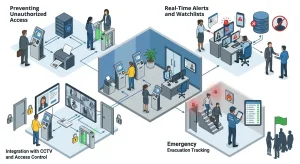 Security VMS is like any VMS, but with a stronger focus on security features.
- Preventing Unauthorized AccessThe first line of protection against illegal facility entry is a security visitor management system. The system ensures only those with permission enter sensitive locations by requiring pre-registration, ID verification, and watchlist screening before each visitor is issued a badge. When a visit concludes or a security alert is raised, access may be automatically terminated.
- Real-Time Alerts and WatchlistsInternal watchlists of people who have been banned or reported can be kept up to date by security staff. The technology instantly notifies security staff via the visitor tracking app, email, or SMS when a visitor’s information matches a watchlist entry made during check-in. This enables them to stop or reroute the visitor before they enter the building.
- Real-Time Alerts and WatchlistsInternal watchlists of people who have been banned or reported can be kept up to date by security staff. The technology instantly notifies security staff via the visitor tracking app, email, or SMS when a visitor’s information matches a watchlist entry made during check-in. This enables them to stop or reroute the visitor before they enter the building.
- Integration With CCTV and Access ControlThe visitor management system can link visitor photos taken during check-in to CCTV footage when coupled with CCTV systems, enabling quick identity verification in the event of an incident. A visitor’s physical badge can be programmatically enabled or disabled in the VMS based on their visit status, thanks to integration with access control systems.
- Emergency Evacuation TrackingSecurity personnel must be aware of every person in the facility, including guests, in the event of a fire alarm or lockdown. Any device, including the mobile visitor tracking app, can access the instantaneous, real-time headcount generated by the visitor management system. In place of the disorganized paper-based headcount procedure, floor wardens can digitally mark visitors as accounted for.
Benefits of Visitor Management System
Trying to convince your staff of the benefits of adopting a visitor management system? The advantages are numerous:
- Enhanced Security & Unauthorized Access Prevention: Reduces the risk of unauthorised individuals entering the facility. Digital records cannot be tampered with, unlike digital logbooks.
- Faster Check-In and Better Visitor Experience– Pre-registration and self-service kiosks help reduce the average check-in time.
- Reduced Front Desk Workload- The system frees the front desk staff from repetitive tasks, allowing them more time to focus on hospitality.
- Real-Time Visibility of People on Premises-The visitor tracking system dashboard provides a live view of every visitor in the building.
- Compliance & Data Privacy Protection-Digital records with encrypted storage make it much more straightforward to demonstrate compliance with GDPR, HIPAA, and other applicable data regulation frameworks.
- Emergency Evacuation Management-In case an emergency breaks out, rest assured that each visitor is accounted for. With Real-time headcounts and zone-based visitor tracking, VMS streamlines emergency evacuation.
- Operational Cost Savings- Reducing paper usage and reducing reception staffing needs improves cost savings.
- Professional Brand Image- A sleek visitor management system indicates attention to detail and a good brand image.
- Scalability for Growing Organizations– Enterprise and cloud-based visitor management systems can grow horizontally, incorporating new users, locations, and connectors without requiring architectural changes. Your guest management system grows alongside your company.
Industry-Specific Visitors Management System
Office Visitor Management System
The visitor management system for office prioritizes speed, integration with employee directories, and a branded visitor experience. Some use cases include scenarios where a client visits, a candidate checks in for a job interview, or contractor management. By integrating with Outlook Mail or Google Calendar, meeting invites can automatically trigger visitor pre-registration.
Healthcare Visitor Management System
Infection control, patient privacy, and regulatory compliance must all be balanced in a healthcare visitor management system. Standard criteria include HIPAA-compliant data handling, time-window limitations, health declaration screening, and visitor limits per patient. In settings where infections are a concern, contactless check-in minimizes touchpoints.
Visitor Management System for Hospitals
By enabling ward-level access control, patient-visitor relationship verification, and interaction with hospital information systems (HIS), the visitor management system for hospitals enhances healthcare capabilities. Without the need for nursing staff to manually intervene, the system can automatically impose hard limits on visitor numbers during infectious disease outbreaks or visiting hour restrictions.
Enterprise Visitor Management System
An enterprise visitor management system provides centralized governance for decentralized operations at major enterprises that handle visitors across dozens of international locations. While location managers are permitted to alter workflows within predetermined bounds, administrators establish enterprise-wide standards. Patterns that would not be obvious at the site level are revealed by consolidated analytics across sites.
Building Visitor Management Systems
These types of VMS are ideal for real estate complexes, gated communities, mixed-use developments, and university campuses. Building visitor Management systems are commonly seen in buildings with numerous tenants, a variety of visitors, and strict access zones. Delivery staff, contractors, residents’ visitors, and event attendees must all be managed by these systems through separate workflows coordinated from a single platform.
Compliance and Data Privacy in Visitor Management System
1. GDPR Requirements
Under GDPR regulations, organizations must obtain explicit consent before collecting visitor data, disclose how that data will be used, and delete it upon request. For a visitor management system to be GDPR Compliant, it must present a consent notice at check-in, capture digital consent, store data only for the defined retention period, and provide tools for efficiently handling data subject access requests (DSARs). GDPR requirements are primarily enforced in the EU.
Build Your Custom VMS with Experion. Click to Get Started.
2. HIPAA in Healthcare Visitor Management System
Healthcare facilities subject to HIPAA must ensure that visitor data is handled with strict confidentiality. Especially if it is any information that could identify a patient or their condition. The visitor management system must enforce role-based access and encrypt all stored and transmitted data. In addition, it must maintain audit logs that demonstrate compliance with regulators. HIPAA mostly applies to US-based organisations.
3. Visitor Consent & Data Retention Policies
Best-practice deployments configure automatic data purging after a defined retention window. This is commonly done after 30, 90, or 180 days.
Visitor records are usually anonymized or deleted during purging.
4. Handling Data Breaches
Data breach risks are minimized through encryption, access controls, and minimal data collection. In the event of a breach, audit logs enable organizations to determine precisely which records were affected. In the event of a data breach, it must be reported. This is a critical requirement under GDPR’s 72-hour reporting obligation.
How to Choose the Best Visitor Management System?
Choosing the best visitor management system from the wide variety of choices available in the market is no easy task. Here are some factors to consider.
- Assessing Security vs Volume Needs
Is yours a high-security, low-volume facility, such as a data center or government office? Or is it a high-volume, medium-security environment like a corporate headquarters?
Start by identifying your security requirements against your visitor volume. If your Security requirements are high, this would require feature selection, whereas volume would need you to prioritize infrastructure and scalability.
- Required Integrations (HR, Active Directory, Wi-Fi)
Visitor Management software does not work as a standalone system; it must be integrated with HR platforms for employee host lookup, Active Directory for SSO, Wi-Fi provisioning for guest network access, and communication tools for host notifications.
A lack of integration options is what forces most organisations to switch vendors.
- ROI of Visitors Management Software
The Return On Investment (ROI) of visitor management software comes from multiple ways: Reduced front-desk staffing costs, eliminated paper and badge resources, faster compliance reporting, and avoided costs from security incidents. Model the ROI across a 3-year horizon and account for scaling to multiple sites to build a compelling business case.
- Scalability & Enterprise Readiness
Confirm if the platform can expand with you. Multi-site support, API availability for custom integrations, SLA commitments, and the vendor’s experience with enterprise clients of similar scale and complexity are important indicators of scalability.
- Common Buying Mistakes
The most common mistake buyers make is underestimating the complexity of integration. During the evaluation process, they often neglect to involve security and IT. Another mistake is that buyers often fail to plan hardware procurement and estimation of installation timelines. A workaround is to run a structured pilot test at any one location before a full rollout across all locations.
Implementation Best Practices for Building Visitor Management Systems
- Hardware Setup (Kiosks, Tablets, Badge Printers)
The choice of hardware is just as crucial as the choice of software. Kiosks with sufficient privacy screens ought to be placed at main entry points. Although tablet-based deployments are flexible, they need infrastructure for safe installation and charging. Before being deployed, badge printers should be evaluated for speed and print quality. Bottlenecks are avoided in high-volume facilities by having redundant hardware at every station.
- Staff Training & Adoption Strategy
Security teams and reception employees must be well-versed in the system to use it confidently and assist guests who encounter problems. Adoption is accelerated, and change resistance is reduced through role-specific training sessions, fast-reference cards at kiosks, and a designated internal champion at each location.
- Monitoring & Visitor Analytics Usage
Review visitor metrics on a regular basis after deployment, including peak check-in timings, average visit duration, frequency of watchlist alerts, and check-in failure rates. These indicators help senior leadership assess the system’s security value, identify operational inefficiencies, and guide personnel decisions.
- Change Management Challenges
The most prevalent sources of resistance are visitors who prefer paper forms and long-tenured receptionists who are accustomed to the current procedures. To address this, clearly explain the “why,” include frontline employees in the implementation planning process, and gather early feedback to make noticeable changes during the rollout phase.
The Future of Visitor Management Solutions
AI-Powered Visitor Screening
AI is being integrated everywhere. Now it’s a part of visitor screening too. It can combine watchlist screening with behavioral analysis. Additionally, AI drives more intelligent pre-registration processes that increase scrutiny for unfamiliar users while lowering friction for reliable, frequent visitors.
Facial Recognition & Biometrics
The field of biometric verification, especially facial recognition, is developing quickly. Facial recognition at kiosks enables hands-free, card-free identification verification in high-security settings, which is much harder to fake than a printed badge.
Smart Building & IoT Integration
To customize the visitor experience, visitor management systems are integrating with IoT infrastructure as buildings become smarter. Examples of this include automatically controlling meeting room lighting and temperature, directing guests using digital wayfinding displays, and providing access to smart lockers or amenities without human intervention.
Predictive Visitor Analytics
Visitor management is becoming more proactive rather than reactive. With the help of Predictive Analytics, it can forecast visitor volumes by time of day, day of week, or organizational event calendar. Over time, this data informs portfolio-level facility planning decisions.
Hybrid Workplace Visitor Policies
Visitor management systems are changing to handle varying on-site populations as hybrid work becomes more common. Now commonplace are features such as visitor capacity control, integration with desk booking systems, and dynamic visitor policies that change based on the number of employees in the building on a given day.
How Experion Can Help Build a Visitor Management System App?
Building a custom visitor management app that identifies specific security workflows, integrates with existing infrastructure, and scales with organizational growth is far more complex than implementing an off-the-shelf solution.
It demands strong expertise in web and mobile development, cloud architecture, security engineering, and UX design – capabilities that Experion brings through its experience in developing enterprise applications.
From First Visit to Full Audit Trail -Own Every Step ! Contact Experion
Conclusion
The visitor management system is no longer just a digital sign-in sheet. It is a critical platform that combines physical security, data compliance, and operational efficiency. Whether you’re deploying a cloud based visitor management system across a global enterprise, implementing a hospital visitor management system with strict patient privacy controls, or rolling out building visitor management systems for a mixed-use real estate portfolio, the principles are the same: automate the workflow, secure the data, integrate with existing systems, and create an experience that reflects well on your organization.
The best visitor management system is the one that fits your security requirements, scales with your growth, and operates reliably in the background – so that your visitors’ first impression of your organization is always professional and secure.
Frequently Asked Questions (FAQ’s)
- What is the difference between a visitor management system and an access control system?
An access control system manages which physical areas employees and badge holders can enter. A visitor management system manages the entire lifecycle of a visitor’s interaction with your facility – from pre-registration and identity verification to host notification and check-out. The two systems are complementary and most effective when integrated. - Can small businesses benefit from using a visitor management system?
Yes. Cloud-based and web-based systems are available at pricing tiers designed for small organizations, often with minimal hardware requirements. Even for a small office with low visitor volumes, the numerous benefits are significant – and the cost is far lower than many expect. - How long does it take to implement a visitor management system?
A standard cloud-based deployment at a single site typically takes 1–4 weeks. Enterprise rollouts across multiple sites with deep integrations may take 3–6 months. Custom-built visitor management system apps have longer timelines that depend on the scope of development. - Is the visitor management system software difficult for employees and visitors to use?
Modern visitor management software is designed for ease of use. The learning curve is minimal for all user types. - What happens to visitor data after a visitor checks out?
After check-out, visitor data is retained for the period defined by your organization’s data retention policy – typically 30 to 180 days. After the retention period expires, records are automatically purged or anonymized. Sensitive fields, such as ID numbers, may be masked immediately after check-out. - How does a visitor management system help during emergencies or evacuations?
During an emergency, security teams can pull an instant, real-time list of all visitors currently checked in, which is organized by floor or zone. This list is accessible from any device, including the visitor-tracking app on a security officer’s smartphone. Floor wardens can mark visitors as evacuated directly in the system, which supports both the evacuation process and subsequent incident reporting. - What is the average cost of a visitor management system?
SaaS-based visitor management solutions typically range from $50 to $500 per month per location. This ballpark estimate depends on features, visitor volume, and integrations. Enterprise licensing with advanced security features, dedicated support, and multi-site management would further increase the pricing.
Ready to move beyond the logbook? Experion has the enterprise development experience to build a visitor management system that’s tailored to your facility, your workflows, and your compliance requirements. Let’s build it together